Watch the video.
Keep browsing everything else.
Hover any video and a small Float Video button appears right on top of it — click it (or press Alt + P) and it pops into a floating player that stays on top while you switch tabs, read, or work. Works on YouTube, Twitch, Netflix, or anywhere with a video tag.
A floating player, tuned the way you want it.
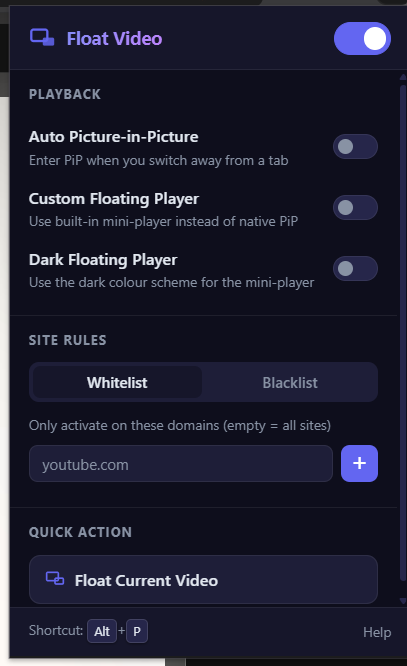
Four small settings, one popup — nothing to configure on the page itself.
Auto Picture-in-Picture
Switch tabs mid-video and it follows you into native PiP automatically — no clicking anything.
Custom floating player
Prefer a styled mini-player over the OS-native one? Switch it on and keep native PiP free for other apps.
Whitelist or blacklist
Run it everywhere by default, or restrict it to (or exclude it from) the exact domains you choose.
Hover button + Alt + P
Hover any video for a one-click button, or press Alt + P to float the largest playing video from anywhere on the page.
Built on Chromium — runs on the browser you already use.
Float Video uses standard Manifest V3 extension APIs, so it installs the same way everywhere.
Set it up once, forget it's there.
Load the extension
Clone the repo, then open chrome://extensions, enable Developer mode, and choose Load unpacked.
Play any video
Open YouTube, Twitch, Netflix, or any page with an HTML5 video — no setup needed per site.
Float it
Hover the video — a Float Video button appears right on top of it. Click it, or press Alt + P from anywhere on the page.
Tune it from the popup
Turn on auto-PiP, switch to the custom dark player, and set your site rules — all from here.
Stop losing your place when you tab away.
Free, open source, and it never leaves your browser.